
Free Volume and Order Flow Profile Settings
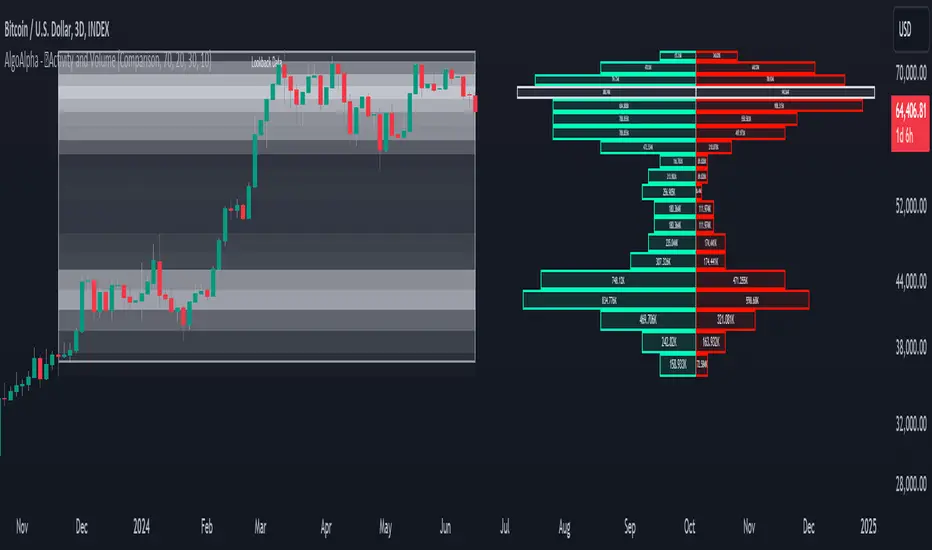
Turns a lookback window into a volume-by-price view, with side-by-side activity or net-flow modes and an optional heatmap.
Free, open-source Pine Script by AlgoAlpha. TradingView account and plan limits apply.
Inputs to start with
- Profile Type
- Comparison shows the two sides separately. Net Order Flow expresses their difference so you can find imbalances more quickly.
- Profile Lookback · 70 by default
- Controls the number of bars in the rolling profile. Keep the lookback fixed when comparing the two display modes.
- Profile Resolution · 20 by default
- Changes how many price rows the chart range is divided into. Higher resolution can reveal detail and split a broad peak across multiple rows.
Try it on a chart
Pick one price level with large bars on both sides in Comparison mode. Switch to Net Order Flow with the same lookback and resolution. A busy level can show little net imbalance if the two sides are similar. Find a second level with a clear imbalance and record how both levels change as the rolling window moves.
What to check. The lookback, price-bin resolution, and volume feed all affect what the profile shows.