
Bollinger Bands Percentile and Standard Deviation Settings
Shows where price sits within Bollinger Bands and pairs that reading with standard-deviation channels.
Free, open-source Pine Script by AlgoAlpha. TradingView account and plan limits apply.
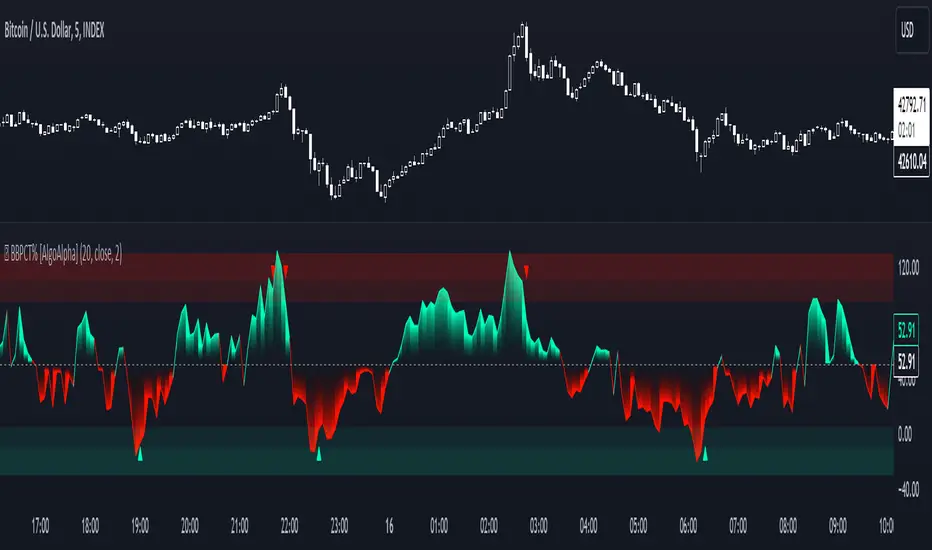
Inputs to start with
- Bollinger Band length · 20 by default
- Sets the baseline window for the bands. Change the window with the same price source so you can compare its effect cleanly.
- Multiplier · 2 by default
- Controls how far the Bollinger Bands sit from their baseline. Wider settings generally make outside-band observations less frequent.
- Show Bollinger Band Stdev %
- Turns on the optional standard-deviation percentage display. Use it to compare periods that look similar by percentile but differ in spread.
Try it on a chart
Log one stretch where price repeatedly stays near an outer band and another where it returns quickly toward the middle. Track the percentile and the band width on the same closed bar. Keeping both observations helps distinguish persistent directional pressure from a brief stretch in a range.
What to check. Price can track an outer band during a trend. Check whether the same setup behaves differently in ranges.