
Breakout Targets Indicator and ATR Level Settings
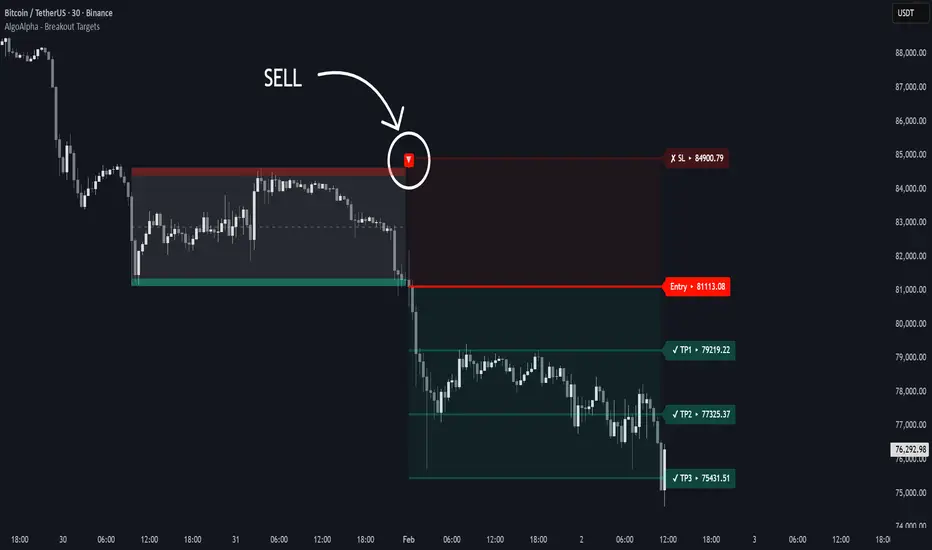
Marks consolidation boxes and projects an entry reference, a stop level, and three targets after a confirmed break.
Free, open-source Pine Script by AlgoAlpha. TradingView account and plan limits apply.
Inputs to start with
- Range Detection Period
- Sets the calculation period for identifying the range. Keep it fixed while comparing distances on the same breakout.
- Prevent Overlap
- Keeps new consolidation boxes from overlapping existing ones when enabled. It affects which setups are drawn.
- Volatility (ATR) period and target multipliers
- ATR sets the volatility input for projected levels. TP1, TP2 and TP3 are multiples of the distance to the plotted stop reference.
Try it on a chart
On a completed breakout, record the range high and low, the first level set that appears, and the ATR configuration. Step forward to see whether price keeps moving away or returns inside the range. Repeat on a failed breakout and compare how existing volatility affected the distance between the projected levels.
What to check. The drawn levels are calculations. They do not place orders, and a breakout can return inside the box.