
Adaptive SuperTrend Settings for TradingView
An adaptive SuperTrend that groups recent volatility into low, medium, and high regimes. The on-chart table shows which regime is active.
Free, open-source Pine Script by AlgoAlpha. TradingView account and plan limits apply.
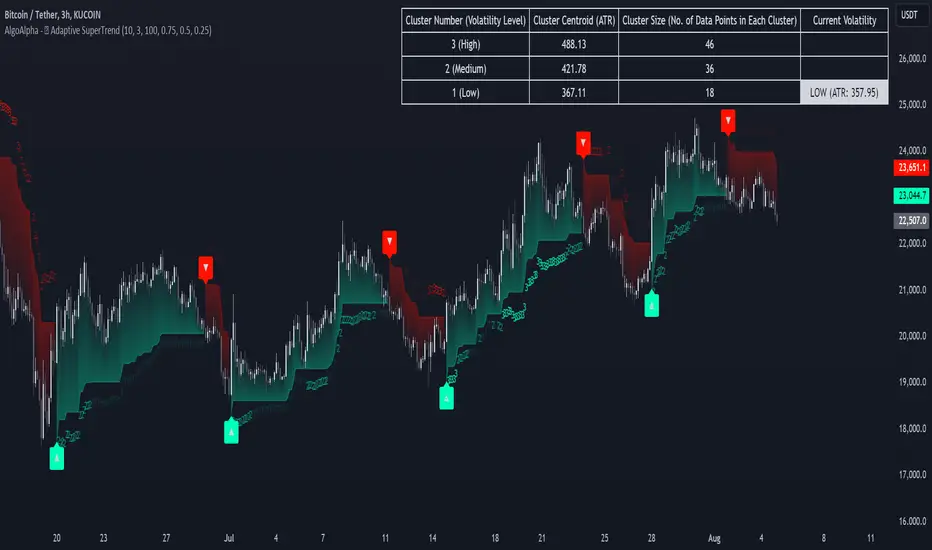
Inputs to start with
- ATR Length · 10 by default
- Controls the average true range window. A shorter window reacts more quickly to a large candle, so keep this fixed while comparing the trend line.
- SuperTrend Factor · 3 by default
- Controls the distance of the bands around price. A larger factor generally leaves more room for a pullback before a flip.
- Training Data Length · 100 by default
- Sets how many recent bars inform the low, medium and high volatility clusters. Different windows can put the same candle in a different regime.
Try it on a chart
Mark one clean trend and one sideways period on a fixed symbol and timeframe. Start with the default factor, then change only the factor. On closed bars, record the number of flips, the delay of the first sustained flip and the volatility regime shown at each event. An input that reduces sideways flips can also react later to a genuine change.
What to check. The model classifies recent average true range (ATR). The trend state can still flip frequently in sideways markets.