
Momentum Bias Index Settings and Oscillator Setup
Compares positive and negative momentum and highlights unusually strong impulses in a single oscillator.
Free, open-source Pine Script by AlgoAlpha. TradingView account and plan limits apply.
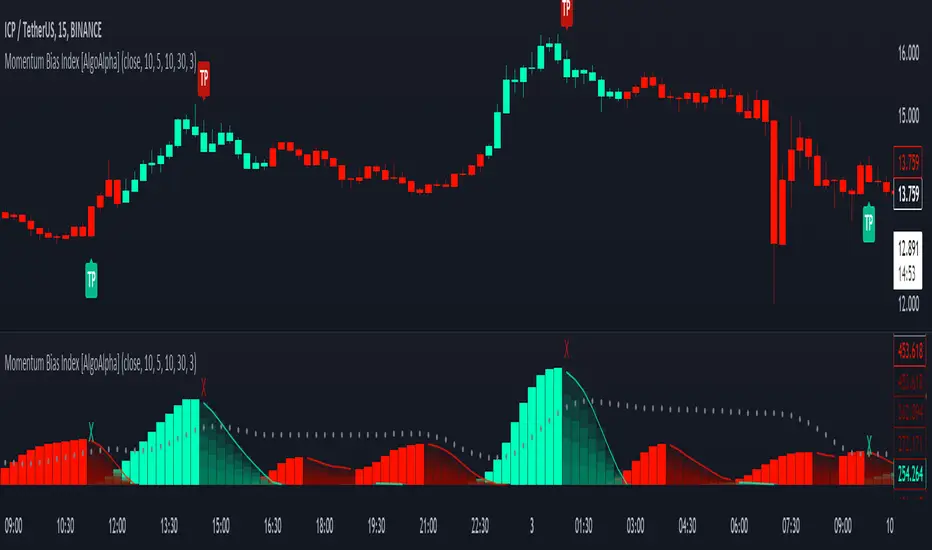
Inputs to start with
- Momentum Length and Bias Length
- Set the momentum calculation and the window used to evaluate directional bias. Start by changing Bias Length with the momentum calculation fixed.
- Standard Deviation Multiplier
- Changes the comparison boundary for unusual impulses. A higher multiplier generally asks for a larger deviation to stand out.
- Overlay Mode
- Turn this off to compare oscillator swings in a dedicated pane. Turn it on if you want the indicator drawn on the price chart.
Try it on a chart
With Overlay Mode off, identify three successive swings to one side of zero. Compare their size with the moves on the other side. If positive swings become smaller while price still makes highs, record the divergence in readings without interpreting a single shrinking swing as confirmation of a reversal.
What to check. Bias length and the impulse threshold change which moves stand out. Compare the settings on a quiet stretch before interpreting spikes.